Microsoft mailbox & calendar connect: current flow, traps, proposal
How the Microsoft connect step actually works today, where it silently fails, and three ways to fix it.
2026-09-15 · proposal, not a build ticket · related: Western Slope go-live tracker — mailbox RCA
On this page
Why this exists
On September 15, Western Slope's leasing agent fell into a flow trap the connect step never intended — she approved the company mailbox connection a second time instead of finishing it. Fede: "they accidentally fell into a trap that we did not intend." Before touching any UI, this page lays out how the flow actually works, names every trap in it, and proposes fixes.
The two approvals, explained once
There are two separate Microsoft approvals, and the flow only works if both happen.
- Company approval (shared mailbox). One person signs in to Microsoft and approves. That opens whichever mailboxes and calendars that person's own account can reach — not a company-wide grant. A shared mailbox has no login of its own, so after approval we still have to be told which mailbox is the leasing inbox, then verify the approving account can actually open it.
- Personal calendar approval (tour booking). Each leasing agent approves her own calendar separately, under her own account. This is a different ask from the company approval and has nothing to do with it.
Current flow, screen by screen
| Screen | Who sees it | What they can do | Where it sends them |
|---|---|---|---|
| Onboarding wizard — "Connect leasing email" | Admins only (any other role is bounced to the dashboard once the company has properties) | Starts the Microsoft sign-in | Back to the wizard, which then asks "Which shared mailbox should Clara reply from?" with a field and "Use this mailbox" |
| Settings company card — "Connect leasing email" | Every member | Starts the Microsoft sign-in | Back to Settings |
| Settings, after approval (admin) | Admin | Sees the mailbox question, a field, and "Use this mailbox" | — |
| Settings, after approval (non-admin) | Non-admin | Sees the same question, a "Waiting on setup" badge, and one button: "Connect a different mailbox" — which restarts the same approval. No field to actually name the mailbox. | Back through Microsoft sign-in, to the same half-done state |
| Dashboard reminder — "finish the leasing email" | Admins only | Dismissable, per session | — |
| Per-building settings | Members who can't finish it | "One step left, finish it in company settings" — no link | — |
| Settings — "My calendar" card | Leasing agents (admins see company status instead, by design, Fede 9/14) | Approves their own calendar | — |
| Back-office company page | Staff | Showed "Mailbox approval granted" even for the half-done state (fix in flight) | — |
The traps
Numbered, most likely to bite first.
- Anyone can start, only an admin can finish. Any member can kick off the company connection, but only an admin can complete it — and the finishing screen never says so.
- The only button re-triggers the same approval. After approval, a non-admin's one option is "Connect a different mailbox," which just restarts the approval and produces the same half-done state. This is exactly what happened at Western Slope: two approvals, two minutes apart.
- No one is told a teammate left it half done. The admin nudge is dismissable and easy to miss.
- Mailbox access is checked too late. Whether the approving account can actually open the shared mailbox is only checked at the very end, after Microsoft, on a page most people never reach. At Western Slope today, neither the leasing agent's nor the owner's account can open
leasing@(verified live). Even the admin path would have failed — with a generic "unreachable." - An extra step got added. The "which mailbox" question is a second step added September 12, when Fede's September 11 ruling was one request, one step.
- Errors are shown raw. A "Not allowed" or "unreachable" answer from the server is shown as-is, with no next step for the person reading it.
- Wording overstated a half-done state. The back-office page said "approval granted" for a mailbox that wasn't actually reachable.
- The calendar connection doesn't do anything yet. Tour booking doesn't read a leasing agent's own calendar yet (Fede 9/14: the gap to close), so a connected personal calendar looks done but changes nothing today.
What Fede has ruled
One company approval should cover the shared leasing mailbox and calendar; a leasing agent connects her own calendar separately. Fede, 9/9
"ONE request for mailbox + calendar." The admin-approval case is the default, and sending it is success. Fede, 9/11
"we book tours by looking at people's calendars not the building" — admins never connect a personal calendar link. Fede, 9/14
"any role should be able to set it up, but make sure it's just once at the org level for that type of client." Fede, 9/15
"let's not jump to changing UX." Fede, 9/15
What Microsoft and other vendors say (research, 2026-09-15)
Microsoft 365 (official docs)
| Model | Who grants | Admin consent screen? | Reads | Sends as leasing@ | Sent folder | Limited to one mailbox |
|---|---|---|---|---|---|---|
Person with access signs in (Mail.ReadWrite.Shared, Mail.Send.Shared) | The person consents; IT gives them Full Access + Send As on the mailbox | No | Yes | Yes | Shared mailbox's Sent Items, when sent via /users/{shared} | Yes |
| App permissions, unscoped | Global admin | Yes, whole tenant | All mailboxes | All mailboxes | Yes | No |
| App permissions + RBAC for Applications (replaces Application Access Policies) | Exchange admin assigns scope in PowerShell | Yes, still tenant-wide on the consent screen | Scoped | Scoped | Yes | Yes |
| Microsoft 365 Group mailbox | n/a | n/a | Group conversations only | No sendMail for groups | n/a | n/a |
Quotes and sources:
- "Allows the app to read and write mail in shared mailboxes... that the signed-in user has access to." Microsoft Graph permissions reference
- Send without rights: "ErrorSendAsDenied... does not have the right to send mail on behalf of the specified sending account." Send mail from other user
- Real-time notifications: "Delegated permission supports subscribing to items in folders in only the signed-in user's mailbox... you can't use the delegated permission... to subscribe to events in another user's mailbox." Outlook change notifications overview. Clara has to poll a shared inbox, not subscribe to it.
- "A shared mailbox isn't intended for direct sign-in... Always block sign-in for the shared mailbox account and keep it blocked." About shared mailboxes
- Granting access: Users > Active users > user > Mail > Send as / Read and manage. "It can take up to 60 minutes for the changes to propagate." Give mailbox permissions to another user
- "RBAC for Applications... replaces Application Access Policies." Application access policies. Consent "is a union operation on the permissions from Microsoft Entra ID and... Exchange Online RBAC." RBAC for applications
Deeper Google Workspace research, verification path and options for Fede now live on their own page: Google Workspace connect flow.
Google Workspace (official docs)
| leasing@ is a... | App reads via a person's sign-in | App sends as leasing@ | Who grants |
|---|---|---|---|
| Google Group / collaborative inbox | No, groups have no Gmail mailbox (the Migration API is import-only) | No | n/a |
| Delegated Gmail mailbox | No, "only available to service account clients that have been delegated domain-wide authority" | No | n/a |
| Alias on a person's account | Yes, mail lands in that person's inbox | Yes, via "Send mail as" | Admin adds the alias, person signs in |
| Real account with its own login | Yes | Yes | Whoever holds the login |
| Domain-wide delegation (service account) | Yes, every user in the domain | Yes | Super admin only. "They don't restrict which users can be impersonated." Google: "Avoid using domain-wide delegation if you can." |
- Any public app using Gmail restricted scopes "must go through a security assessment," reverified "at least every 12 months." Restricted scope verification (CASA)
- Help Scout: "Google does not offer OAuth access for Google Groups accounts." Help Scout article 78
- Also checked: Gmail API delegate settings, Alias and signature settings, Domain-wide delegation best practices, Send mail as a group or alias
Mainstream tools on an Outlook shared mailbox
| Tool | Method | Their words |
|---|---|---|
| Front | Person with access signs in | "'Read and manage' permissions, 'Send as' permissions, 'Send on behalf of' permissions." Front article 2068 |
| Missive | Person with access signs in | "Select an account that has access to the shared mailbox." Missive docs |
| Nylas | Person with access signs in | "The grant needs Microsoft Send As or Send on Behalf permission for that mailbox, granted by a tenant admin." Nylas admin approval guide |
| Zendesk | Converts it to a normal login | "You must first convert the shared mailbox into a regular user mailbox." Zendesk article |
| Freshdesk | IMAP with a member's login | "Should be a member of the shared mailbox and have read and managed permissions and sent as permission." Freshdesk article |
| HubSpot, Help Scout, Gorgias, Intercom | Forwarding rule | Help Scout: "Once you turn on forwarding in Outlook, stop managing email there." Help Scout article 1269 |
| Gong, Outreach, Salesforce, Cronofy | Company-wide admin consent | Outreach: "This app will get access to specific resources for all Users in the Organization." Outreach article |
Leasing AI vendors
| Vendor | Leads come from | Replies from | Calendar | Microsoft/Google admin step |
|---|---|---|---|---|
| EliseAI | PMS/CRM feed. "Redirect all leads to your AI Assistant's email address" (Knock launch steps) | Vendor address (a third-party claim, not confirmed by EliseAI itself) | Per-agent Outlook/Google sync | Not found in 11 help articles |
| Funnel | Vendor per-community forwarding address | Customer's own mailbox via Nylas OAuth | Per-user OAuth via Nylas | Not found |
| Knock, Zuma, Rently, Colleen, Respage, Entrata, Yardi, AppFolio | PMS/CRM feed | Not found | Per-agent or PMS calendar | Not found |
| BetterBot | n/a | n/a | One Outlook/Google calendar per bot | "BetterBot must change client permissions before users connect" |
Sources: EliseAI help article, EliseAI help article, Nylas / Funnel case study, Funnel Leasing blog, Rently agent scheduler, BetterBot calendar docs
How PM companies run leasing@
- Microsoft: a shared mailbox is the norm for "a shared inbox for managing coordinated replies." Staff get Full Access + Send As in the admin center, live within about an hour.
- AppFolio guest cards go to the email of the person who posted the listing: "unpost and repost the listing so it goes to the current employee's correct email address." AppFolio guest cards
- Apartments.com allows "up to six email lead destinations" per property, changed via support. Apartments.com listing contact
- Zillow uses a contact email per listing. Zumper uses the account email. Squarespace forms use "the account email address of the site owner or contributor who added the form."
- Net: centralizing leads into leasing@ is a manual, per-surface setting at every PM company, not a single switch.
Recommendation
One model, both platforms: Clara signs in as the leasing identity, through the account that already has access to it. No forwarding, no DNS, no company-wide consent.
- Microsoft: the person who opens leasing@ in Outlook signs in once. If nobody has access yet, IT gives that person Full Access + Send As on the mailbox (admin center, one screen, up to 60 minutes to take effect). This is Microsoft's own design, and what Front, Missive and Nylas all require. Clara reads the shared inbox by polling, since real-time notifications aren't allowed on a shared mailbox through a person's sign-in, and sends through the shared mailbox so replies sit in its own Sent folder.
- Google: leasing@ must be an alias on the leasing agent's account (that person signs in, Clara sends as leasing@) or a real account that signs in itself. A Google Group or a delegated mailbox cannot be read by any tool through a person's sign-in. Before the first Google client, PropFlow has to complete Google's restricted-scope verification (the CASA security assessment), which is a project of its own.
- Fallback when a client cannot or will not do either: route leads from the PMS and listing sites to a Clara address (the Yale pattern). Clara then replies from a PropFlow address.
- Flow fix that ships with this (already ruled): ask which mailbox and who reads it before the sign-in, any role may do it, verify access at sign-in, plain words if it fails, show status only once connected.
- Tenant-wide application permissions (rejected 2026-09-15). Fede: "why would we request access to the entire company? some clients wont do that" and "this seems very risky and unnecessary." No leasing-AI competitor found asks a customer for company-wide mailbox consent.
- Forwarding + DNS-authenticated own-domain send (rejected 2026-09-15). Fede: "we want the emails to come from leasing@ as the first preference", "read and write", "no hacks", "no crazy ideas like DNS."
Proposal · Proposed, pending Fede's pick
| Option | What the person sees | Fixes the two-approvals trap? | Pros | Cons |
|---|---|---|---|---|
| A, delegated sign-in scoped to one mailbox (current recommendation) | Anyone can start. Screen 1 asks for the shared mailbox address. Screen 2 is Microsoft sign-in by a person who already has access to that one mailbox (their IT grants it in a minute if they don't). On return, we check that account can actually open that address. Success: "Leasing mailbox connected: leasing@…, approved by <name>." Failure, shown immediately, with a plain next step. Done once per company; after that, only a status line and a "change" action. Two dark PRs in flight: the shared-inbox listener (Clara subscribes to the shared mailbox, not only the signer's inbox) and the address-first connect flow. | Yes | One request, one step. Clara reads and replies from the client's own address, e.g. leasing@. Catches the access problem on the spot. Matches the 9/11 and 9/15 rulings. | Needs a real-time mailbox-access check, and the receive side of delegated sign-in built (today's subscription only reads me/messages) |
| D, forward + own-domain send (rejected 2026-09-15) | Client sets up one forwarding rule from their shared inbox to a PropFlow ingest address. Clara sends from a subdomain of the client's own domain, authenticated via DNS (SPF/DKIM/DMARC). No Microsoft sign-in, no Microsoft permission, at all. | Rejected. Fede: "we want the emails to come from leasing@ as the first preference", "read and write", "no hacks", "no crazy ideas like DNS". | ||
| B, admin-only finish (today) | Same as the current flow above | No | Already built, simple to explain | Assumes the admin's account can reach the mailbox. False at Western Slope, the trap that caused this page |
| C, company-wide access grant (rejected 2026-09-15) | One admin consent grants our app read/send access to every mailbox in the tenant. Rejected: too much trust to ask of clients who won't grant it, and no leasing-AI competitor we found asks for it either. Kept here only as a record, not a live option. | |||
Current recommendation: Option A (delegated sign-in scoped to one mailbox) as the standard approach for shared mailbox connection. Personal calendars stay per-person approvals. Two dark PRs in flight to ship this: the shared-inbox listener and the address-first connect flow. Note: the next client, Situs Group, is on Google Workspace with a shared leasing address, so the chosen model must work on Google too.
Connect flow: what changes (2026-09-15)
The problem. Kat signed in with Microsoft, then PropFlow asked "which shared mailbox?" on a page only admins can use. She could not answer, saw "Not allowed", and nothing was connected.
The fix, in one sentence. Ask for the mailbox address first, check right after sign-in that the account can open it, say in plain words if it cannot, and let any team member finish.
| Step | Today (what Kat saw) | Proposed |
|---|---|---|
| 1. Address | Asked after Microsoft, admin only | Asked first, on the Settings card: "Which shared mailbox should Clara reply from?" |
| 2. Microsoft sign-in | Same | Same, any team member |
| 3. Check | None. "Not allowed." | Checked at once. If it fails: "We can't reach that mailbox with this account. Ask your Microsoft admin to give this account access to it." |
| 4. Done | Showed "Done" with nothing connected | Shows the mailbox address, who approved it, and a Change link |
Three held PRs carry this (8648 address first, 8664 check and plain-words error, 8665 any member may finish). Nothing shipped. Real screenshots of both flows, taken on localhost with our test org, will be added here.
Real screens (localhost, test company, 2026-09-15)
Signed in as a non-admin leasing agent in our test company. Microsoft's own sign-in page is not shown. Only one screen changes: the "which shared mailbox?" screen after Microsoft sign-in.
1. Before anything is connected. Same on both sides.
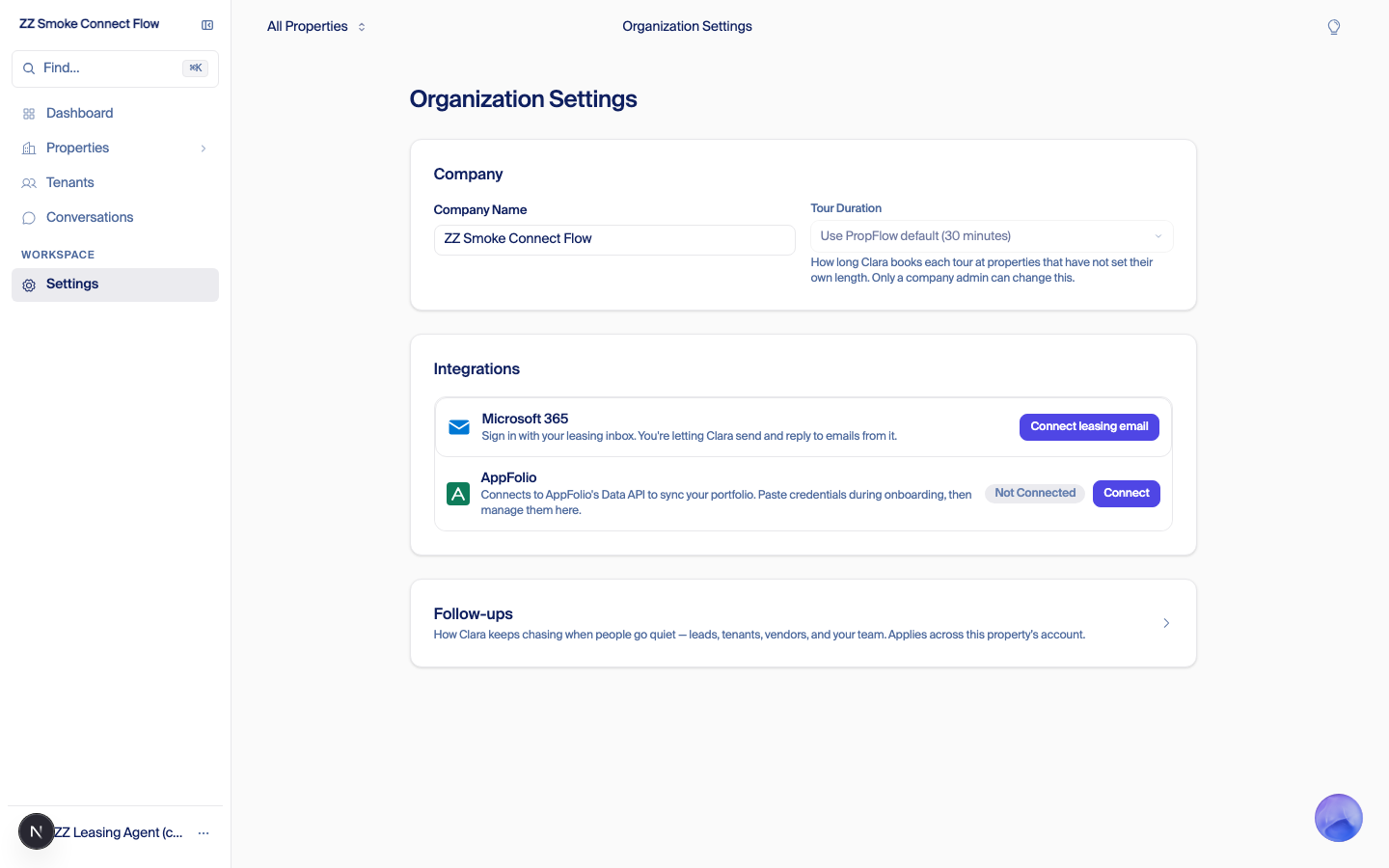
2. After Microsoft sign-in, today. A "Waiting on setup" badge and a button that only restarts the sign-in. A non-admin cannot type the mailbox. This is where Kat got stuck.
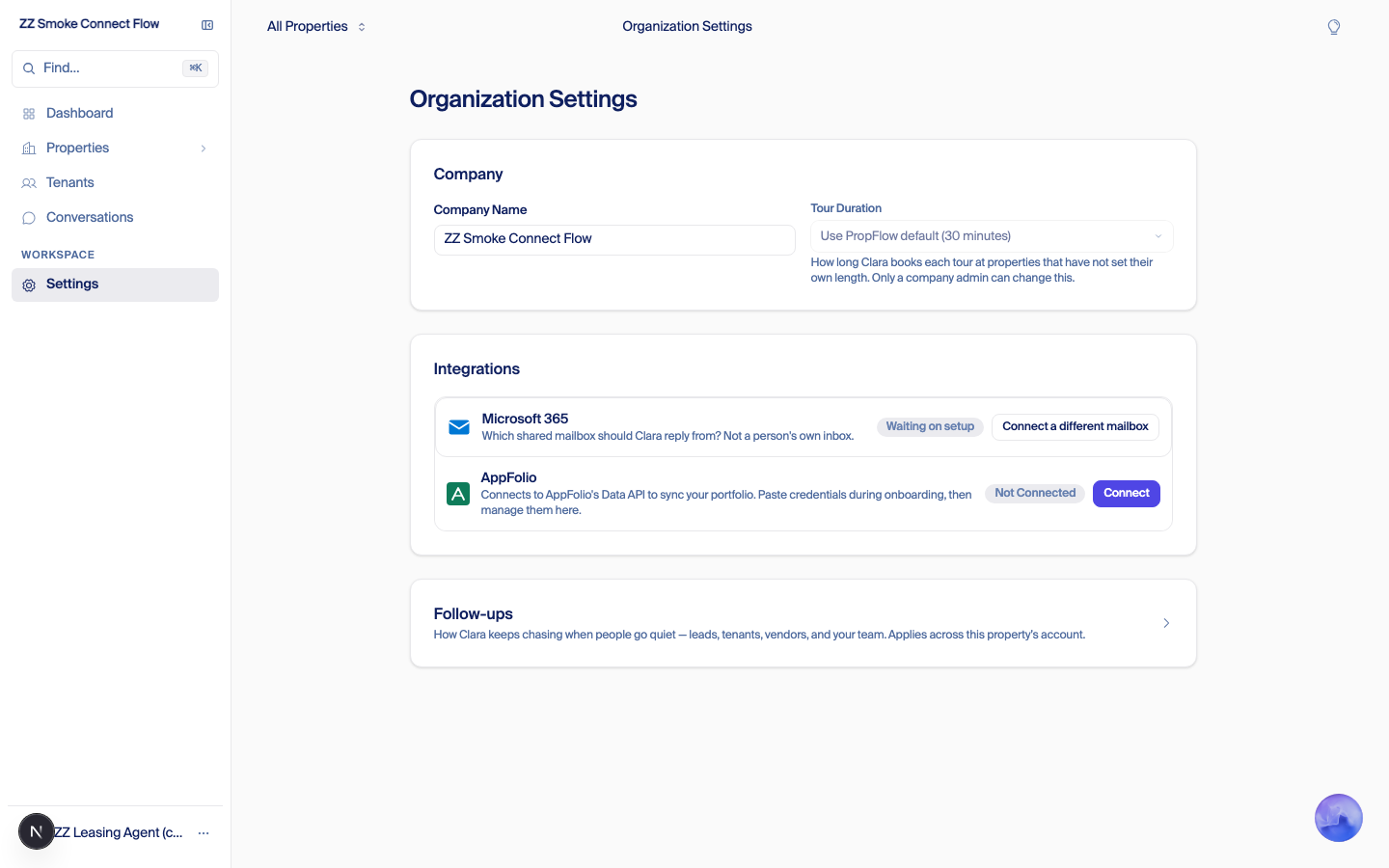
2. After Microsoft sign-in, proposed. The same person sees an address field and "Use this mailbox" and can finish.
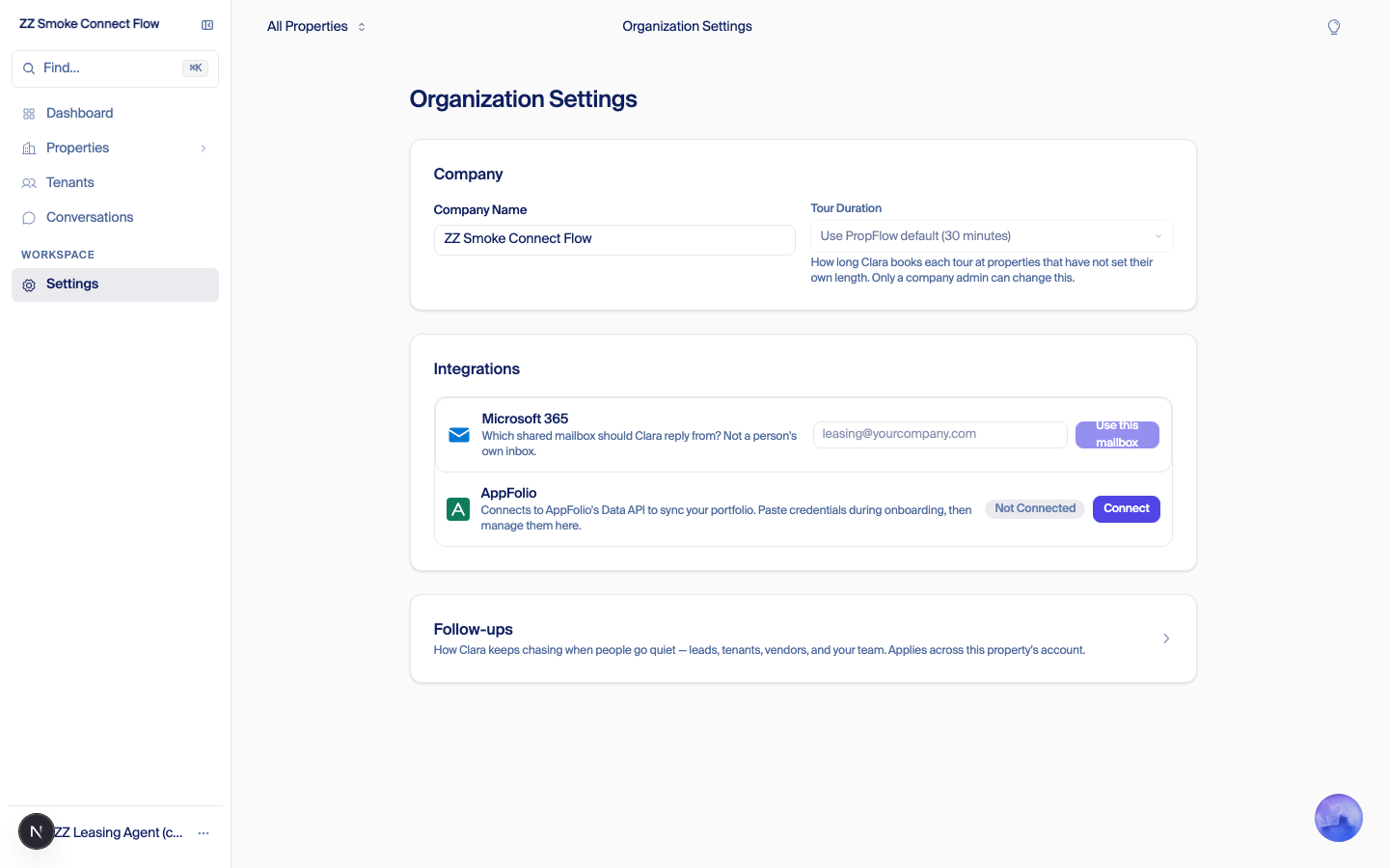
QA (Fede, 2026-09-15): the "Use this mailbox" button on the proposed screen is slop: label wraps to two lines, disabled state looks clipped, input and button crammed into the card row. Not acceptable as is.
What the screens show. On this branch the address is still asked after Microsoft sign-in, not before. The change is that a leasing agent can finish. If the decision is admin-only setup with staff connecting only a calendar, this screen should not be reachable by a leasing agent, and the address field moves to the admin's card before the Microsoft step. Not captured: the "we can't reach that mailbox" error, which needs a real Microsoft check.
Design of record (Fede, 2026-09-15 night): email setup is chosen at client setup, read only once live
Onboarding assumed every client connects one Microsoft shared inbox. We already run three shapes: Camellia (one inbox per property, the property signs in as it), Western Slope (one shared inbox for the company), Yale (a PropFlow address). Fede's decisions, approved for build:
- Two setup questions, answered by PropFlow staff on the customer setup form before the admin is invited: whose address does Clara reply from (the client's own, or a PropFlow address), and one for the company or one per property.
- Read only once live. Changing the shape after Clara is live is a destructive operation; the card shows the choice read only and only a deliberate PropFlow-staff action changes it.
- No provider choice, ever. In "client's own" mode the admin types the address and PropFlow works out the provider from the domain's mail records. Microsoft gets the Microsoft sign-in; Google and others see "not supported yet". Nobody picks "Microsoft".
- What the admin sees. Client's own, company-wide: one card on the company, type the address, sign in, plain-words error if the account cannot open it. Client's own, per property: a connect card on each property (Camellia today). PropFlow address: a read-only card with the address, a copy button, and one line to point listing sites and AppFolio at it. Onboarding progress shows "Email: done" once set.
- What staff see. Leasing agents and property managers see only "connect your calendar". Company settings and integrations are hidden from non-admins; the AppFolio button no longer shows to people the server would refuse.
- Nearest wins stays the reply rule: a property's attached mailbox, otherwise the company's.
- Existing clients get stamped: Camellia = own, per property; Western Slope = own, company; Yale = PropFlow address.
What the admin card looks like, per shape
The card lives on the company settings page, admins only. Same card, four states. Nothing else on the page changes.
Shape A. Client's own inbox, one for the company (Western Slope). Before connecting:
Leasing email
Clara replies from your leasing inbox.
Not a person's own inbox.
ConnectShape A, after the admin signs in with Microsoft and the check passes:
Leasing email
Connected
leasing@westernslopepm.com Change
Approved by Jay, Sep 16, 2026
Shape B. Client's own inbox, one per property (Camellia). The company card is only a note. Each property page keeps the connect card it has today.
Leasing email
Each property connects its own leasing inbox from its property page.
Shape C. A PropFlow address (Yale). Nothing to connect. The admin copies the address into Zillow, Apartments.com and AppFolio.
Leasing email
Clara replies from this address.
clara+yale@propflowai.co CopyPoint your listing sites and AppFolio lead notices at this address.
Which shape a company gets is set by PropFlow at client setup and is read only once live. Leasing agents and property managers never see this card, only "connect your calendar".
Built 2026-09-16, all merged dark: #8715 setup fields, #8728 admin card per shape, #8714/#8720 settings hidden from non-admins. Nothing turned on for any client; existing clients are not stamped yet (backfill script in #8715, dry-run only, Fede's go).
Build plan (dark, one concern per PR, nothing turns on): (1) the two setup fields on the company record plus the customer setup form, with the read-only rule; (2) the admin card per shape, replacing the card UI from 8648/8664 (their logic stays); (3) hide company settings and integrations from non-admins, calendar card only. 8665 closed. Fede on the old UI: "I don't like any of this new UI"; the "Use this mailbox" button was called out as slop.
PropFlow Docs